Use this AI Planning tool to answer questions about the Earth Rivers and Ironbark route and generate individual ride plans.
- Overview and Access
- Questions, Comments and Suggestions
- How to Use the Earth Rivers and Ironbark Planner
- Examples of Use
- Default Assumptions used by Earth Rivers and Ironbark Planner
Overview and Access
The ERI Planner is free to use. However, it has limitations:
- The underlying AI product is Google’s NotebookLM – so you will need a google account to access the Planner.
- If you don’t have an existing google account you can create one from the access screen.
- It may seem a pain to have to login with your own google account. However, an individual login means that only you can see your chats and responses. It also recalls the history of your chats and ride plans every time you log in (until you delete it).
- Your relationship in using the Planner is with Google and its data and privacy protocols. I cannot see what any users ask or the responses they get.
- The AI in NotebookLM operates on a closed environment of static data. This means –
- The ERI Planner cannot search the internet or get new updated information.
- The ERI Planner cannot give you a live internet link.
- If you want a live link for current or more detailed information use the Earth Rivers and Ironback route page. That page has many live links to look for more details or current information.
- The Planner is better suited to larger screens like a PC or Tablet rather than mobile phones.
Link to the AI Planning Tool – Earth Rivers and Ironbark Planner. The Planner opens in a new tab.
Read the Instructions and Examples below before using the Planner for the first time.
.
Questions, Comments and Suggestions
This AI Planner is very new and still a work in progress.
I am very keen to hear from users. What do you think of it? What works, what didn’t, any suggestions for improvement?
The fastest and easiest way to comment is to use the comments section below. Access to the comment section is set so anyone can use it. You don’t have to login or give any personal details. Just type your thoughts. I get an email when anyone posts a comment.
.
How to Use the Earth Rivers and Ironbark Planner
When you open the ERI Planner it has 3 panels as shown below.
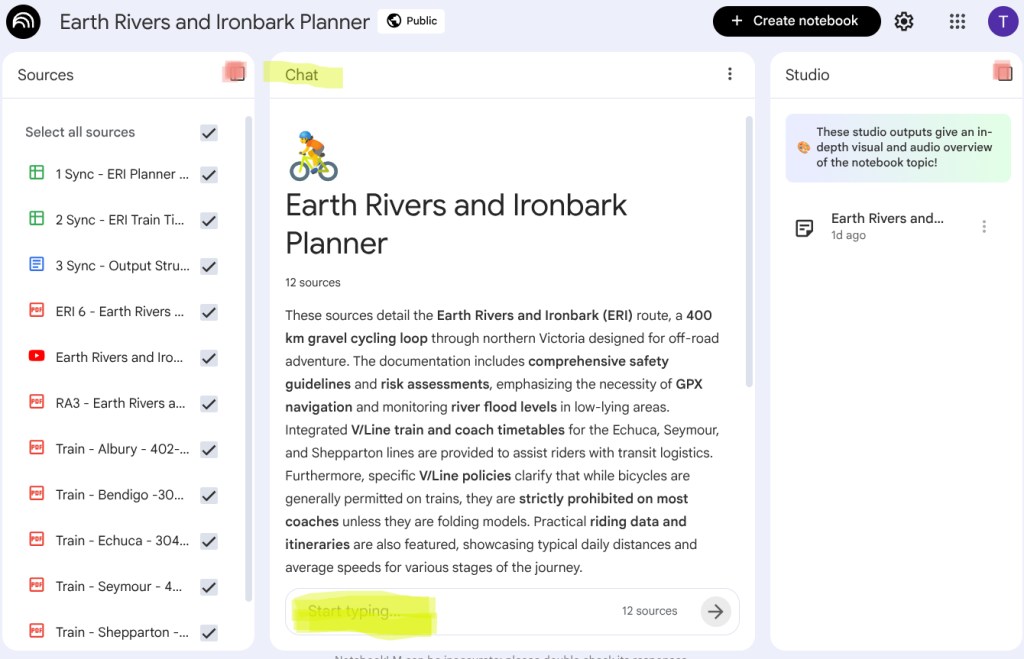
The middle panel. The main panel you will use is called ‘Chat’. It is in the middle. You type your questions in the box at the bottom of the panel. Both these are highlighted in yellow.
If you have a widescreen (i.e. PC) you may see side panels. If you are on a narrow screen (e.g. mobile) the side panels are menu options.
The Left Panel. The left panel is called Sources. It has a list of sources. The AI uses the selected (ticked) sources to answer your questions. Leave all these sources selected so the AI can provide the most thorough answers. You can minimise the left panel to get it out of the way. Click on the icon at the top right of the left panel (highlighted pink).
The Right Panel. The right hand panel is called Studio. You cannot use this, NotebookLM shuts it down in shared notebooks. The panel might contain some documents I add about using the Planner or examples of Plans. You can minimise the right panel to get it out of the way. Click on the icon at the top right of the panel (highlighted pink).
Chat Responses and Discussion.
- You type your prompt into the prompt box. The prompt should include:
- Your context – i.e. your situation and what you are trying to achieve.
- Plus a specific question – i.e. what do you want the model to tell you.
- The model responds
- It answers your question, trying to make it specific to your context.
- It also adds other information that might be useful for you to know given your question.
- Ongoing discussion. You review the response and decide to engage in more discussion. You don’t have to retype your context or original question. Just continue the discussion.
- You might seek further explanation of the ride Plan, e.g. Why does the Plan stop overnight at Toolleen instead of Heathcote?
- You might add further information yourself and ask for an amended plan, e.g. I want to have a break of 30 mins for lunch every day. Plus it is summer so I am happy riding to 6:30pm on any day. Please redo the plan.
The little numbers in responses. The chat response includes little numbers in circles at the end of sentences. These are references to where in the sources the model got the information. If you click on the number it will show you a snippet of the relevant source document. These numbers are not live links to the internet. Clicking on these numbers isn’t helpful to most users.
Saving your Plan or Response. You may want to keep your plan or the model’s response. You can click on the copy button at the bottom of the response. This puts the response (and only that response) into clipboard and you can paste elsewhere. If you want to save your prompts or other responses, you have to copy each one separately. It helps to think about how you are going to do this before hand. For example have a landing document open a ready to paste in to.
.
Examples of Use
Examples of using the Earth Rivers and Ironbark Planner
| Initial Prompt | AI Response |
|---|---|
| I live in Melbourne. I am thinking of a getting a train for a weekend overnight ERI ride from either Nagambie or Murchison East station to Heathcote and back to the other station (either Nagambie or Murchison East). I want to go via Rushworth on one leg. Tell me which station I should start at and which station I should finish at (given weekend timetable). | AI Plan for Nagambie-Heathcote-Rushworth-Murchison with Trains |
| What are the best overnight options for the section between Echuca and Shepparton? | AI on Overnight Options between Echuca and Shepparton |
.
Default Assumptions used by Earth Rivers and Ironbark Planner
The model uses internal assumptions in its Ride Plans when the user does not specify something. These assumptions are deliberately conservative. You can override the default assumptions by stating whatever suits you in your prompt to start a Chat. Even after a Ride Plan response, you can prompt the AI to use your new requirement and redo the Plan.
- Riding Speed and Time: The average riding speed is 15 km/hr, which includes incidental stops and time spent negotiating obstacles.
- Ride Duration: Unless specified otherwise:
- Rides start at 09:00.
- The Ride Plan tries schedules breaks to try and avoid a continuous riding block of 2 hours or more.
- The Ride Plan gives warnings if there is over 6 hours of riding per day, or rides finishing after 17:00.
- Route and Direction: Unless specified otherwise –
- The Plan assumes you are riding in a clockwise direction.
- The Plan assumes you want to go via stage 2A (via Nagambie).
- If there is no end location, the Plan assumes a the full loop returning to your starting point.
- Overall Strategy:
- The Plan aims to spread the total riding time evenly across all days of your trip.
- The Plan aims to allocate stops each day in a sensible way. However, there are contradictory aims. One one hand, the model tries to spread Breaks throughout the day to avoid fatigue. On the other hand, It tries to bundle different types of stops together at one location to be more efficient.
- Note this aspect of the model needs further refinement. Scheduling stops during the day is difficult for the model currently. Sometimes the model produces a strange day schedule. I don’t think this is a huge issue. I expect riders will just ignore it and stop where they want. But I would like to work out an improvement eventually.
- Breaks and Supplies:
- Lunch – The Plan includes a daily 45-minute lunch break. Lunch is scheduled when convenient, usually in period between 12:00 and 2:00.
- Breaks – The Plan schedules 15-minute rest breaks in the middle of any continuous riding block that exceeds two hours.
- Supplies – The Plan includes 15-minute stops to buy supplies when needed. These are triggered when heading into remote areas or planning to camp overnight outside of a town.
- Transport and Transitions:
- Bikes always – The Plan assumes the User has a bike. The Plan only recommends trains that carry bikes.
- Which Timetable – The Plan uses the Monday to Friday train timetable when a day is not specified.
- On a day that includes Train travel, the Plan:
- Includes a 30-minute transition time from train arrival to when your riding starts.
- States the waiting time from when your ride arrives at the Station to the Train departure time. The Plan warns you if this waiting time is less than 30 mins.
- If there is extended wait time the Plan suggests things to do in the town while you wait.
.
 Nix-Tracks
Leave a comment